Linux系统服务管理与NTP时间同步服务运维详解
一、systemctl服务管理基础
1.1 systemctl简介
systemctl是Systemd系统和服务管理器的核心命令工具,用于控制systemd系统和服务管理器。作为现代Linux发行版(RHEL/CentOS 7+、Ubuntu 16.04+等)的默认初始化系统,它取代了传统的SysVinit系统。
1.2 基本服务管理命令
1.2.1 服务状态查询
`bash
# 查看服务状态
systemctl status ntp.service
systemctl status ntp # 可省略.service后缀
检查服务是否启用(开机自启)
systemctl is-enabled ntp
检查服务是否活跃(正在运行)
systemctl is-active ntp`
1.2.2 服务启停控制
`bash
# 启动服务
sudo systemctl start ntp
停止服务
sudo systemctl stop ntp
重启服务
sudo systemctl restart ntp
重新加载配置文件(不重启服务)
sudo systemctl reload ntp
服务重载(若支持reload则reload,否则restart)
sudo systemctl reload-or-restart ntp`
1.2.3 服务自启配置
`bash
# 启用开机自启
sudo systemctl enable ntp
禁用开机自启
sudo systemctl disable ntp
查看服务依赖关系
systemctl list-dependencies ntp`
1.3 服务配置文件管理
Systemd服务配置文件通常位于:
/usr/lib/systemd/system/- 系统安装的服务配置/etc/systemd/system/- 用户自定义或修改的服务配置
修改配置后需重新加载:`bash
sudo systemctl daemon-reload`
二、NTP时间同步服务深度解析
2.1 NTP服务的重要性
在信息系统运行维护中,时间同步至关重要:
- 日志一致性:多服务器日志时间戳统一,便于故障排查
- 安全认证:Kerberos、SSL证书等依赖准确时间
- 分布式系统:数据库集群、负载均衡等需要时间同步
- 计划任务:确保cron作业在正确时间执行
2.2 NTP服务安装与配置
2.2.1 安装NTP服务
`bash
# RHEL/CentOS
sudo yum install ntp
Ubuntu/Debian
sudo apt-get install ntp`
2.2.2 主配置文件解析
配置文件位置:/etc/ntp.conf
关键配置项:`conf
# 使用阿里云NTP服务器(中国用户推荐)
server ntp.aliyun.com iburst
server time1.aliyun.com iburst
server time2.aliyun.com iburst
或使用国际NTP池
server 0.pool.ntp.org iburst
server 1.pool.ntp.org iburst
server 2.pool.ntp.org iburst
允许本地网络同步(可选)
restrict 192.168.1.0 mask 255.255.255.0 nomodify notrap
本地时间源(当外部服务器不可用时)
server 127.127.1.0 # 本地时钟
fudge 127.127.1.0 stratum 10 # 设置层级为10(最低优先级)
日志配置
logfile /var/log/ntp.log`
2.2.3 服务管理实践
`bash
# 启动NTP服务
sudo systemctl start ntpd
设置开机自启
sudo systemctl enable ntpd
查看详细状态
sudo systemctl status ntpd -l`
2.3 NTP监控与故障排查
2.3.1 时间同步状态检查
`bash
# 查看NTP对等状态
ntpq -pn
输出解释:
remote - NTP服务器地址
refid - 上级时间源
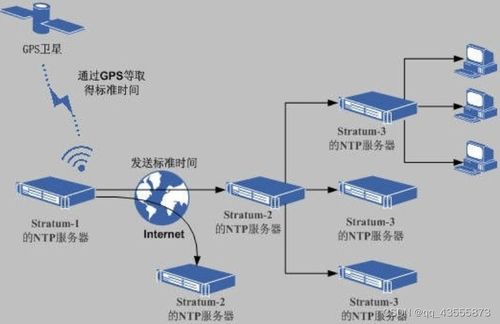
st - 层级(stratum),数字越小越接近原子钟
t - 类型(u=单播,b=广播)
when - 上次同步距现在的秒数
poll - 轮询间隔(秒)
reach - 可达性检测(八进制,377表示成功)
delay - 网络延迟(毫秒)
offset - 时间偏移量(毫秒)
jitter - 时钟抖动(毫秒)
查看时间同步状态
ntpstat
# 正常输出:"synchronised to NTP server (...)"
查看系统时钟状态
timedatectl status`
2.3.2 手动时间同步
`bash
# 强制立即同步
sudo ntpdate -u ntp.aliyun.com
对于使用systemd-timesyncd的系统
sudo timedatectl set-ntp true`
2.3.3 常见问题排查
`bash
# 1. 检查NTP端口(UDP 123)是否开放
sudo netstat -tulnp | grep :123
2. 查看NTP日志
sudo tail -f /var/log/messages | grep ntp
sudo journalctl -u ntpd -f # systemd系统
3. 测试NTP服务器连通性
ntpdate -q ntp.aliyun.com
4. 防火墙配置(如需)
sudo firewall-cmd --add-service=ntp --permanent
sudo firewall-cmd --reload`
2.4 高级配置场景
2.4.1 内网NTP服务器搭建
当多台服务器需要同步且外网访问受限时:`bash
# 主NTP服务器配置(/etc/ntp.conf)
server ntp.aliyun.com iburst
restrict 192.168.1.0 mask 255.255.255.0 nomodify notrap
客户端配置
server 192.168.1.100 iburst # 指向内网NTP服务器`
2.4.2 Chrony替代方案
现代Linux发行版推荐使用Chrony:`bash
# 安装
sudo yum install chrony # RHEL/CentOS
sudo apt install chrony # Ubuntu
配置(/etc/chrony.conf)
server ntp.aliyun.com iburst
管理命令
sudo systemctl start chronyd
sudo chronyc sources -v # 查看时间源`
三、信息系统运维最佳实践
3.1 服务监控脚本示例
`bash
#!/bin/bash
ntp_monitor.sh
SERVICE="ntpd"
LOGFILE="/var/log/ntpmonitor.log"
checkservice() {
if systemctl is-active --quiet $SERVICE; then
STATUS="RUNNING"
else
STATUS="STOPPED"
systemctl restart $SERVICE
echo "$(date): $SERVICE restarted" >> $LOGFILE
fi
# 检查时间同步
if ntpstat &> /dev/null; then
SYNC="SYNCHRONIZED"
else
SYNC="UNSYNCHRONIZED"
echo "$(date): Time not synchronized" >> $LOG_FILE
fi
echo "$(date): $SERVICE - $STATUS, Time: $SYNC"
}
check_service`
3.2 自动化运维配置
使用Ansible批量管理NTP服务:`yaml
# ntp_setup.yml
- hosts: all
tasks:
- name: Install NTP
yum:
name: ntp
state: present
when: ansibleosfamily == "RedHat"
- name: Configure ntp.conf
template:
src: ntp.conf.j2
dest: /etc/ntp.conf
notify: restart ntp
- name: Start and enable NTP
systemd:
name: ntpd
state: started
enabled: yes
daemon_reload: yes
handlers:
- name: restart ntp
systemd:
name: ntpd
state: restarted`
3.3 性能优化建议
- 调整轮询间隔:对于稳定环境,可适当增加poll值减少网络开销
- 多时间源配置:配置3-5个可靠的时间服务器提高可用性
- 日志轮转:配置logrotate防止日志文件过大
- 监控告警:设置偏移量阈值告警(通常>100ms需关注)
四、
在信息系统运行维护中,systemctl作为现代Linux服务管理标准工具,与NTP时间同步服务结合,构成了系统稳定运行的基础保障。运维人员应掌握:
- systemctl的核心操作:启停、状态查询、自启配置
- NTP服务的深度配置:多时间源、内网架构、故障排查
- 运维自动化实践:监控脚本、配置管理工具集成
- 性能与安全平衡:在保证时间精度的同时优化系统资源
通过系统化的服务管理策略和精细化的时间同步配置,可显著提升信息系统的可靠性和可维护性,为业务连续性提供坚实支撑。
本文档将持续更新,建议结合实际环境进行测试验证。
最后更新日期:$(date +%Y-%m-%d)